
Verdict: RUSVPN is a VPN with limited server and functionalities but it does a great job with whatever it has and provides a proper VPN service at a reasonable price, with it’s best plan priced at only $2.99/month.
- Military-grade encryption
- Reliable and smart encryption protocols system
- Fast speeds of the VPN with low ping
- User-friendly and intuitive design
- 30 days money-back-guarantee
- No-logging policy
- Compatible with multiple platforms and devices
- No plug-in for Opera
People have started taking their online privacy seriously. This has led to more and more people opting for a VPN. This huge jump in the total number of people who are looking to opt for a VPN has brought with it a large opportunity. And to utilise this opportunity many VPN companies have been popping up. Not only has this opened the market wide open buy it also overwhelms new users because of the sheer number of options available. So it shouldn’t come as a surprise that many decent VPNs remain under the radar and never get the attention that they deserve. RUSVPN is one such vpn and in today’s article we will try and change that. We will look at the different aspects of the vpn and decide for ourselves if it deserves more attention. But like every other review of ours, we will decide a criteria on which we will judge this VPN.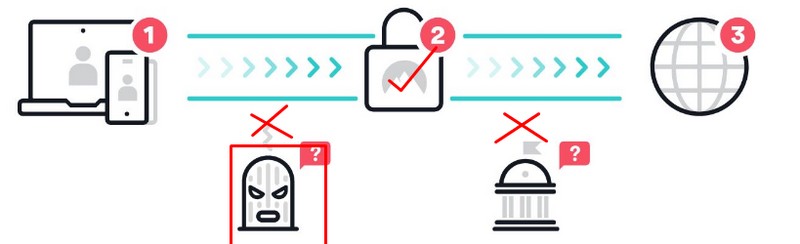
Table of Contents
Criteria for a good VPN
There are a few aspects that every good VPN should have. The more a VPN performs in each of these aspects, the better it is considered. In this section we will establish a few of these criterias and in the coming sections we will see how good RUSVPN is in those criterias.
- Security: This is the topmost priority for most VPN users. The level of security a VPN can provide decides how effective a VPN is. A good VPN can be characterized by the following features: Level of encryption: A good VPN will use military-grade encryption like Advanced Encryption Standard (AES-256). This is the most common type of encryption used by VPNs and is very effective in protecting your information. DNS leak protection: A good VPN should provide you protection from DNS leaks. Kill Switch: Another feature that most good VPNs should have. It prevents your traffic from leaving in case your connection is interrupted. These and many other features ensure your security is protected.
- Level of encryption: A good VPN will use military-grade encryption like Advanced Encryption Standard (AES-256). This is the most common type of encryption used by VPNs and is very effective in protecting your information.
- DNS leak protection: A good VPN should provide you protection from DNS leaks.
- Kill Switch: Another feature that most good VPNs should have. It prevents your traffic from leaving in case your connection is interrupted. These and many other features like this will decide how good a VPN is in protecting our privacy.
- Speed: What is the benefit of having a private and secure connection if there is no high-speed bandwidth to accompany it? This is the case with most free and low tier VPNs. Their speed is so slow that all you could do is barely browse a few sites or so. If you are someone whose primary reason for using a VPN is to stream and download content then this will affect you.To be able to stream contents without any buffering, then as per Lifewire your internet speed needs to meet these requirements:- 0.5 Mb/s to view standard definition movies on a laptop computer. While you can stream at speeds of 0.5 Mb/s, the quality is grainy on a large screen, much like watching an old VHS movie. Netflix recommends at least 1.5 Mb/s. 3 Mb/s to view standard definition video (480p) on a T. 4 Mb/s to view high definition video ( 720p, 1080p ). 5 Mb/s or more for the best 1080p experience. 15 Mb/s to stream 4K (but 25 Mb/s is preferred). Also recommended is a 4K Ultra TV with an HEVC decoder. So for a VPN to be considered a good VPN, it has to at least meet these above requirements.
- Logging Policy: Another primary reason people use VPNs is to hide their online activities and prevent ISPs from monitoring and tracking their online activities. The thing is even though the ISP and other third parties won’t be able to track users, the VPN provider will still possess this particular information. There is no guarantee what they will do with that data and nothing is stopping them from selling these data to third party buyers. Also if the VPN provider is based in one of the member countries of the 14 eyes, then there is a chance government surveillance officials might ask for these data in the guise of national security. This is especially relevant if your VPN provider is based in a 5/9/14-Eyes Alliance country. VPNs in these countries can be legally obligated to provide your data.For this reason a good VPN should not store any of your information at whatsoever. So a VPN is as good as its logging policy. Most good VPNs have a strict no-logs policy.
- Number of Servers: The number of servers a VPN has is also a great indicator of how good a VPN is. Having a large number of servers available has its advantages. Here are two such reasons why large no servers can be beneficial. First, more no of servers means that you can switch between servers in case one of the servers isn’t working. So you can find a server that best suits your requirements. Secondly, a huge no of servers would mean that there will be less congestion in a particular server. As a result you will get better speeds. So any good VPN should have a large number of servers spread across the globe.
- Location of Servers: Having a server in multiple regions and locations would mean that we can access unblocked content in all these regions. So along with having a large number of servers, a good VPN should also have these servers spread across more countries and regions.
- Pricing: Pricing is the final deciding factor for most people. After all the VPN that you decide to go for will largely depend on your budget. So it doesn’t matter how many features a VPN has if the pricing isn’t right a VPN won’t sell. So for a VPN to be considered good, it has to have the perfect performance to price ratio.
What is the need for a VPN in 2022?
Now that you know what a VPN is you will be itching to know what is the need for it and what are some of its use cases. You would also want to know whether VPN is a must and you won’t be able to access the internet without it. The answer is that it isn’t required to be connected to a VPN while accessing the internet. It’s just that using a VPN makes your connection secure and anonymous. Let us now see some common uses of a VPN.
- Hide Your Browsing Activity: Whenever you browse the internet, your Internet Service Provider can see what websites you are visiting and what files you are downloading. Not only this, but even other prying eyes will also be able to track your activity. This data can be sold to third parties who might use it for malicious activities. So if you want to hide your browsing activity from your ISPs and other third parties then you can connect to a VPN. Using a VPN your connection becomes secure and anonymous. On the local network only a single connection will be visible. All the other traffic that needs to be transferred will pass through the VPN connection. This way your Internet Service Provider (ISP) or Governmental agency won’t be able to track you. They will not be able to link your session with your IP address. However one thing you should keep in mind is that VPN providers may still track and log your activity.
- Bypass ISP throttling: Most Internet Service Providers (ISP) intentionally slow down the speed of a user’s broadband internet connection. This is usually done by the ISPs to regulate a network’s traffic and to alleviate network congestion. While this is a common practice the result of this throttling is that users get a lower speed than they were supposed to. This throttling can be bypassed by using a VPN. A VPN routes your connection through their secure tunnel, preventing your ISP from throttling your connection.
- Unblock Geo-Restricted Content: Imagine these scenarios. You are someone who is traveling to a different country and want to access your native Netflix or Prime Video library. Or you are someone who wants to access the catalog of a different country because a particular title isn’t available in your region. Normally you would be out of luck in both these scenarios but using a VPN can easily solve these problems for you. A VPN will mask your location based on the server you are connected to. This enables you to access these region-restricted services from anywhere in the world.
- Bypass Internet Censorship: Many countries are known for notoriously censoring a majority of the online content as well as restricting access to many websites. China is one such country that comes to mind. In such cases you can use a VPN to gain access to these restricted contents. However one thing to note is that most VPNs aren’t capable of bypassing this.
- Downloading Torrents: Downloading torrents might land you in trouble in multiple countries. Even if it isn’t illegal, downloading a torrent can be painstaking because most ISPs throttle the speed. Some ISPs might even serve you notices for downloading torrents. Universities and other Institutes also block torrents. Using a VPN you can bypass these restrictions and also ensure that you don’t land in trouble.
RUSVPN Review
RusVPN is a relatively small VPN provider with limited functionalities. It has 362 servers spread across 38 countries. RUS in RUSVPN stands for Reliable, Unlimited and Secure. RUSVPN might have a few and limited functionality but it performs great in whatever features it has. The VPN isn’t that popular which means that it isn’t under the radar of authorities. This is a good thing because your data won’t be at a high risk of being swooped in by authorities. Let’s take a look at the different aspects of RUSVPN.
Privacy
RusVPN is being developed in Northern Ireland by the Atrix Group Ltd. In order to prevent western authorities such as European countries and the United States to have jurisdiction over RusVPN, it is registered in The Commonwealth of Dominica. This serves the purpose very well.
Network Protocols
The protocols a VPN supports decides how effective the VPN is in terms of its privacy. These protocols enable the VPNs to safely send the user’s data through the internet. This is necessary for browsing websites, using social media, or doing just about anything else online. They make sure that the user’s connection remains private no matter what. A tunneling protocol is simply a way to transfer information from point A to point B. It may offer an underlying layer of encryption, but it is not considered secure. However a VPN protocol is different from the tunneling protocol. It has many extra functionalities. It performs end-to-end encryption and also authenticates the traffic data. It also uses obfuscation of the data which helps in hiding the traffic that the VPN is serving.
Like most other VPNs, RusVPN supports all of the most used protocols. This includes the following Protocols
- OpenVPN (UDP, TCP)
- IKEv2
- IPSec
- L2TP
- PPTP
Any of these protocols are more than capable of providing you with a secure connection. So as long as you use one of these protocols, you don’t really need to worry about your privacy.
Encryption
The level of Data Encryption in a VPN also decides how secure a VPN is. Along with hiding your real IP, RusVPN also encrypts the users’ traffic which means not even the Internet Service Provider will be able to access the data that is being transmitted. RusVPN uses a 2048-bit encryption to protect the users’ data. RusVPN transmits all the traffic and encrypts it with a reliable 2048-bit encryption which is only decrypted on the servers of RusVPN. This ensures that the data transmitted remains confidential and secure.
Kill Switch
To increase the user’s privacy, RusVPN also has a network kill switch feature. So if your VPN connection ever gets interrupted or the connection drops unexpectedly, this will protect you. In such cases where your VPN connection drops unexpectedly, Kill Switch disconnects you from the internet, safeguarding your privacy. Network Lock will immediately stop any kind of traffic from either entering or leaving your device. This way even if your VPN connection fails, RusVPN will make sure you are protected
So RusVPN performs pretty good in terms of protecting the users privacy. Let’s now look at its logging policy.
Logging Policy
So you used a VPN and managed to keep your traffic and activities safe from your ISP. However, your VPN provider still has our data and there’s no saying what they can do with it. This is one of the biggest concerns most people have while buying a VPN. What if your VPN provider is tracking and logging your activities? What stops them from selling your data? Almost every VPN you will find has their straight out claims that it doesn’t log any data. And this is a bit misleading in our opinion. Because in order to function properly, there are a few user data that a VPN needs to have. But in case of some VPNs there is no transparency as to what they log and what they don’t. So to figure out the privacy of the VPN, we took a look at its logging policy. Here’s what is written in RusVPN’s official website.
What information do we collect and store when you register in our VPN service?
To make your privacy maximum, we collect a minimum of information – just your email. We do not request or save your name, IP address, real address, phone number, and other personal information. Payments go through Decta Limited, and we do not keep your credit card details in our system. Data entered through the payment page is transmitted via encrypted SSL protocol.
What information is recorded while clients are connected to our VPN service?
We run a non-permanent connection log to solve technical problems including random name generation and internal IP address assignment (private IP address) which are reliably removed every few hours. We strictly and purposefully do not write down any information to mitigate our legal liability. We do not monitor the activity of your browser and do not record any records. It is simply impossible with our internal interface. All data about the use of the service is anonymous and is not tied to your real, public IP address.
Going through their privacy policy, it seems that even though the VPN is low on detail, it still respects the user’s privacy. So if that’s your worry, then RusVPN has you covered.
Geo Unblocking
With an increase in the number of streaming services available, the number of shows in each is decreasing. So as a result many shows now aren’t available to stream in a particular region but are available in some other region. This has given rise to a completely new use of VPNs. People have now started using VPNs so that they can unblock these Geo restrictions and what shows and movies that are not available in their region. However, Netflix is able to recognize whether or not someone is using a VPN or not and hence will not serve them the blocked content.
RusVPN managed to work with streaming services during our tests. So, if you are looking to “Netflix and Chill”, then RusVPN won’t limit you. It also worked with other services such as Amazon Prime, Hulu, HBO, and many more. Whatever you are looking to watch, RusVPN has you mostly covered.
Speed
Other than privacy and security, the other thing that we cannot compromise is Speed. No matter what purpose we use it for, we will need high-speed internet to get an uninterrupted connection. So even if a VPN is very secure, if it doesn’t have enough speed then it’s of no use. So we checked out the speeds that we got while using RusVPN. But before that we measured our speed without a VPN.
We got a download speed of 42.04 Mbps and an upload speed of 35.54 Mbps. The response time we got was 11 ms. So this was our base speed without having a VPN. Now let’s see how a VPN affects the speed.
For our test we connected to three different locations: US (auto mode), UK and Canada. On each of these servers we got at least more than 25mbps speed and a 20mbps+ upload speed. The US server had the highest speed and was followed by Uk and Canada. In terms of ping, only the US had a good enough ping 62. The other two were more than 100 ms.
So, RusVPN produced speeds that were fast enough for streaming, downloading, and other browsing activities. So if you have a high-speed connection, be assured that you won’t be limited by its server speed.
Servers
This is where RusVPN is lagging while compared to other big names. It has only around 338+ servers spread across 30 countries in 5 continents. So this is a bit low. But a normal user won’t be affected unless they are looking for a server in a specific location. Most of these servers are very reliable and there were no hiccups in terms of the server speed.
Supported Devices
RUSVPN supports the following devices.
- Operating Systems: Windows 10, macOS, Linux
- Mobile devices: Android Phones, Tablets, iPhone (iOS) and iPads (iPadOS)
- Browsers: Mozilla Firefox Google Chrome
RusVPN Pricing
RusVPN has three different pricing plans.
- Monthly: This is priced at $9.99 and is the most expensive among all its plans
- 1-Year plan: This plan costs $59.88 and is billed once every 12 months. The per month cost for this plan is $4.99
- 2-Year plan: This is their most popular plan. It costs $107.64 and is billed once in 36 months. The per month cost for this plan is $2.99.
RusVPN Review Verdict
RUSVPN is a VPN which isn’t that known in the VPN market. It has limited servers and functionalities but it did a great job with whatever it had. RusVPN manages to provide a proper VPN service at a reasonable price, with its best plan being priced at $2.99/month. It meets most of the common requirements of an average user. So if you are someone who is looking for a good and affordable VPN and you can make do with limited functionalities, you should give RusVPN a shot.
Read Next:

Leave a Reply